


Most sales reps are using AI tools for prospecting, but they’re not getting great results. The problem is that they treat AI like a search engine, asking basic questions and getting generic answers in return.
Let’s be honest about what “using AI” actually looks like for most sales reps right now. It usually means asking ChatGPT, Claude, or Gemini to write a generic outreach email that sounds like a robot, or maybe using it to check for spelling mistakes and grammar. It feels less like a world-class co-pilot and more like a clumsy intern.
Knowing about these tools is one thing, but knowing exactly what to command it to do is another. This guide provides the tactical, step-by-step workflow for using AI to design and carry out a prospecting strategy that gets replies.
Key Takeaways: What You’ll Learn
- Learn a 4-step workflow for using AI in your daily prospecting. This guide details a complete process, from setting up your “AI co-pilot” and conducting deep account research to crafting outreach and practicing for calls.
- Get specific, copy-and-paste prompts for sales tasks. You’ll get ready-to-use prompts to generate a complete strategic account brief, build a 3-step multi-channel outreach sequence, and role-play objections with AI.
- Train your AI to sound like you. Learn how to use features like “Custom Instructions” in ChatGPT or “Projects” in Claude to teach the AI about your company and ideal customer just once, so all future responses are tailored to you.
- Master advanced prompting techniques for better results. Go beyond basic questions with methods like the “Chain of Thought” to get a step-by-step analysis and the “Persona Switch” to have the AI critique your outreach from the buyer’s perspective.
- Understand AI’s true role as a co-pilot, not an autopilot. You’ll see why AI is meant to create your “first draft” and why the final human review is essential for fact-checking and maintaining an authentic voice.
- Find out how you can create a shared “prompt library” for your team. This article explains how you can build a team cheat sheet of your best-performing prompts to get consistent results and replicate success.
How Can ChatGPT Improve Sales Prospecting?
It’s a frustrating reality for most sales teams that the majority of a rep’s day isn’t actually spent on selling.
You’ve probably seen the industry research: reps spend only about 25% of their time in actual conversations with prospects. The rest of those valuable hours get eaten up by the necessary grind of prospecting: tedious research, data entry, and other admin tasks.
This is precisely where your AI co-pilot steps in. The best way to think about using AI for prospecting isn’t as a simple task-doer, but as your personal assistant that handles the most time-consuming parts of the job.
It helps you win back your time and improve your outreach in a few key ways:
- It automates boring LLM sales research. Instead of spending hours digging through websites and news articles, tools like Perplexity or ChatGPT can build you a detailed account brief in minutes. This frees you up to focus on your actual sales strategy.
- It helps you personalize outreach at scale. This is the big one. The biggest challenge in sales is personalizing emails without spending your entire day on just a few leads. AI can draft highly relevant emails and LinkedIn messages by analyzing a prospect’s role and company, letting you connect with more people, more effectively.
- It gets you ready for any conversation. Beyond just finding facts, AI can help you prepare strategically too. You can ask it to generate insightful questions, identify a prospect’s likely challenges, refine your sales pitches, or even role-play common objections so you’re never caught off guard.
Think of it this way: AI handles the prep work so you can focus on the human parts of selling that actually win deals. It saves you time so you can have more authentic conversations that drive revenue.
How to Use AI for Sales Prospecting
Now, let’s walk through the prospecting workflow step-by-step, showing how you can use AI in your day-to-day prospecting, broken down into simple steps that fit into your existing sales processes.
Step 1: Set Up Your AI Co-Pilot
Before you can get great answers, you need to tell your AI what you’re all about so it knows how to help. Not all AI tools are the same. For writing human-sounding emails, Claude 3.5 is currently a favorite among sellers. For deep web research, Perplexity is fantastic. For roleplay and general strategy, ChatGPT and Gemini are incredibly powerful.
- Give Your AI Some Context: In ChatGPT, there’s a feature called “Custom Instructions” (or “Projects” if you use Claude). You basically give it permanent notes about you, your job, what you sell, and why it’s great. Set this up once, and your generated content will be way more on-point and sound like it actually came from you.
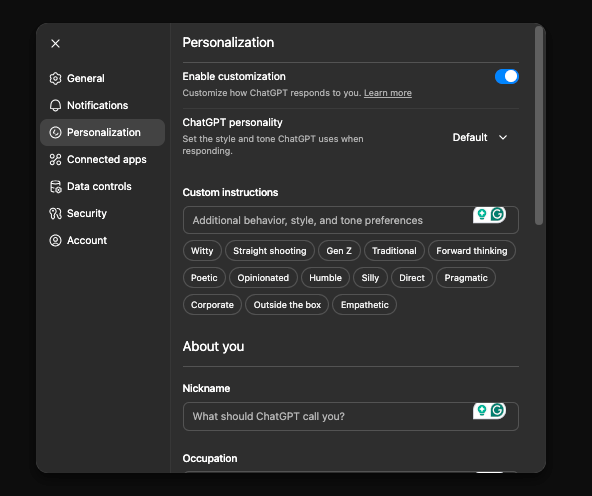
- Set this up once, and you’ll be able to generate content that will be way more on-point and sound like it came from you.
- Create a Team “Cheat Sheet” of Prompts: When you find a prompt that works great, don’t let it get lost! Start a shared Google Doc or Notion page for your team. Organize it by tasks like “Finding Info on a Company” or “Writing a Cold Email.” This way, everyone can easily get the same great results. You can find 20+ more chatgpt prompts for sales in our complete guide.
Step 2: Figure Out Who You’re Talking To
Don’t just look at a company’s homepage. Use AI to get the real story and create a quick “cheat sheet” for your top-priority accounts. Make sure you are using an AI tool connected to the web (like ChatGPT Plus, Gemini, or Perplexity) so it can actually read the links you give it.
Prompt for a Quick Company Brief:
"Act as a B2B sales strategist. Analyze [Company Name]'s website ([URL]) and recent news from the last quarter. Create a strategic account brief for our company, [Your Company Name], which sells [Your Product/Service]. The brief must include:

1) Top 3 Business Priorities: Based on their latest reports and initiatives, what are their likely strategic goals for this year?

2) Potential Pain Points: Given these priorities, what are 3 specific challenges their [Target Department, e.g., 'Marketing Department'] is likely facing that our solution can address?

3) Trigger Events: Identify any recent trigger events (e.g., new executive hires, product launches, funding rounds) that create an opening for our solution.

4) Key Language: Pull 3-4 key phrases or terms they use on their website to describe their business or values.

5) Competitor Insight: Mention one of their known competitors and how our value proposition differs."
You probably want to do a quick fact check on this newly found information. Even better, ask the AI to cite its sources and provide the exact URLs it used so you can quickly verify the data yourself.
Step 3: Craft Multi-Channel Outreach Sequences
Instead of just one random email, use AI to map out a few steps to get their attention. You want to tell a consistent story across a few messages.
Prompt for a Multi-Channel Sequence:
"Create a 3-step outreach sequence to target [Job Title, e.g., 'VP of Operations'] at [Company Name], based on the account brief I provided. The goal is to book a 15-minute discovery call.

Step 1 (LinkedIn Connection Request): Write a 300-character connection request that references their company's recent [Trigger Event].

Step 2 (Email 1 - Day 2): Write a 100-word email that expands on the connection request. Acknowledge their role and connect their company's [Business Priority] to a specific, quantifiable benefit of our solution. End with a clear, interest-based call-to-action.

Step 3 (Email 2 - Day 5): Write a follow-up email that provides a short, relevant case study or a single powerful statistic about how we helped a similar company. Keep it under 75 words."Step 4: Practice Before the Big Call
Never go into a sales call unprepared. You can actually use AI to practice and get ready for tough questions, and practice your objection handling.
Prompt for a Practice Session (Use Voice Mode):
"Let’s do a role-play. Act as [Prospect Persona, e.g., 'a skeptical CFO at a mid-sized manufacturing company']. I am a sales rep for [Your Company Name]. I am going to start a discovery call with you. Your goal is to raise common objections related to budget constraints, satisfaction with a current vendor, and resistance to change. Respond to my questions and statements as this persona would, and give me feedback at the end on how I could have better addressed your concerns."This would be a good opportunity for you to use the Advanced Voice Mode in ChatGPT or Gemini Live. This allows you to have the role-play play out completely hands-free, like a real, natural conversation between you and the prospect.
Advanced Prompting Techniques for Prospecting
Basic prompts give basic results. The following methods will help you get unique, high-value output that most people don’t know how to generate.
The “Chain of Thought” Method
Instead of asking for a complex output all at once, guide the AI step-by-step. This forces a more logical and detailed result:
- Prompt 1: “First, analyze this company’s annual report and identify their top 3 stated strategic priorities for the year.”
- Prompt 2: “Great. Now, based on those 3 priorities, what are the most likely operational challenges their VP of Supply Chain is facing?”
- Prompt 3: “Perfect. Now, write a cold email to that VP of Supply Chain that directly connects our logistics software to solving the second challenge you identified.”
The “Persona Switch” Method
After generating one of your outreach messages, ask the AI to critique it from the perspective of your target persona. This is an incredibly powerful way to refine your messaging:
“Now, act as a busy, skeptical CFO who receives 200 emails a day. Read the email draft above. What is your immediate reaction? What parts are compelling, and what parts would make you immediately delete it? Rewrite it in a way that would actually capture your attention.”
Iterating and Refining
Your first output is rarely the final version. Use follow-up commands to tweak the results. Simple phrases like “Make it more concise,” “Change the tone to be more formal,” or “Replace the jargon with simpler terms” can turn a good response into a great one.
Measuring Success and Maintaining the Human Touch
To know if your AI-assisted prospecting is effective, you need to track your metrics. Compare your reply rates and meetings booked from before and after you implemented these AI strategies.
However, it’s important to remember the SOCO philosophy: AI tools like ChatGPT are here to create the first draft, not the final product.
They get your ideas out and handle the heavy lifting of research. The final human review is what ensures every message is authentic, personalized, and reflects your personal brand.
Putting It All Together: Final Tips for Prospecting with AI
As you start using these prompts, you’ll run into some common questions about what AI can and can’t do. Here are a few key things to remember to get the most out of these tools.
Can ChatGPT, Claude, Gemini, or CoPilot Generate Leads?
It’s important to be clear: These AI chat tools can’t generate leads on its own because it can’t find contact information. Its role is to be your research and communication assistant. It helps you build a detailed picture of your ideal customer and then generate text for the highly personalized outreach needed to convert those prospects into qualified leads.
How Can I Use AI to Find Decision-makers in a Company?
While most AI tools can’t browse live organization charts, you can ask it to identify the most likely decision-makers for a specific product. For example: “For a company that sells cybersecurity software, what are the top 3 job titles I should be targeting within a 500-person tech company, and what is each one’s primary concern?”
What’s a Good Prompt for Personalizing Cold Outreach?
If you need a reliable prompt for personalizing a message, this structure works wonders. It’s specific, gives the AI clear instructions, and focuses on providing value.
“Analyze the LinkedIn profile of [Name], [Title] at [Company] ([URL]). Write a 3-sentence email that references their recent post about [Topic] and connects it to how our [Product Category] helps solve a related business challenge. The tone should be helpful and sound like to coming from a fellow peer.”
Can LLMs help me understand a prospect’s business challenges?
This is where AI truly shines. It’s fantastic for connecting the dots between broad industry trends and the specific problems a person in a certain role might face. Using prompts like the ones in this guide will give you a huge head start in understanding your prospect’s world.
A great example is asking: “What are the top 3 trends affecting the retail industry, and how would that create daily challenges for a Head of Merchandising?”
A Final, Crucial Reminder: Always Fact-Check
Think of the AI’s output as a fantastic starting point, not the final word. Always take a moment to fact-check any important details, like statistics or recent company news. LLMs can occasionally provide inaccurate or outdated information (sometimes called “hallucinating”), though modern tools linked to the live web are getting much better at this. Even so, verifying the facts before a call is crucial for maintaining your credibility.
AI Powered Sales Training
Many sales reps are already using tools like ChatGPT or Gemini to craft emails. But there’s a more advanced way to use AI that most reps don’t know about. By unlocking AI’s full potential, your team can get more done in less time, allowing them to focus on what they do best: building relationships and closing deals.
Our AI Powered Sales Training focuses on advanced prompts and systems for AI tools they already have access to.
Help your team use AI to handle objections better, personalize outreach, and close more deals.
